v0.3.5 Alpha · released 2026-10-20

A simple, elegant
network tool

Built on the Clash core, Diodos brings nodes, subscriptions, connections and diagnostics together in one tidy app — with the same design language on desktop and Android. You cannot manage what you cannot see.

  • Free and open source
  • Windows · macOS · Linux · Android
  • Three interface languages
Latest version

0.3.5 Alpha

Released 2026-10-20

Release notes
Platforms

4

WindowsmacOSLinuxAndroid
Interface languages

3

简EN繁
License

Open source

GitHub repository

Open and auditable

All source, commits and release notes are public on GitHub.

Clash core

Routing rules and policies run on a mature core; the UI focuses on clarity.

Lightweight and native

Built with Tauri. Installers land in the 35–50 MB range, with no bundled runtime.

Multilingual UI

Simplified Chinese, English and Traditional Chinese, with locale-aware dates.

Features

One workspace for the whole state of your network

From subscriptions to routing, from latency tests to route tracing, Diodos keeps the everyday and the occasional within reach.

See all features
dashboard

A modular dashboard

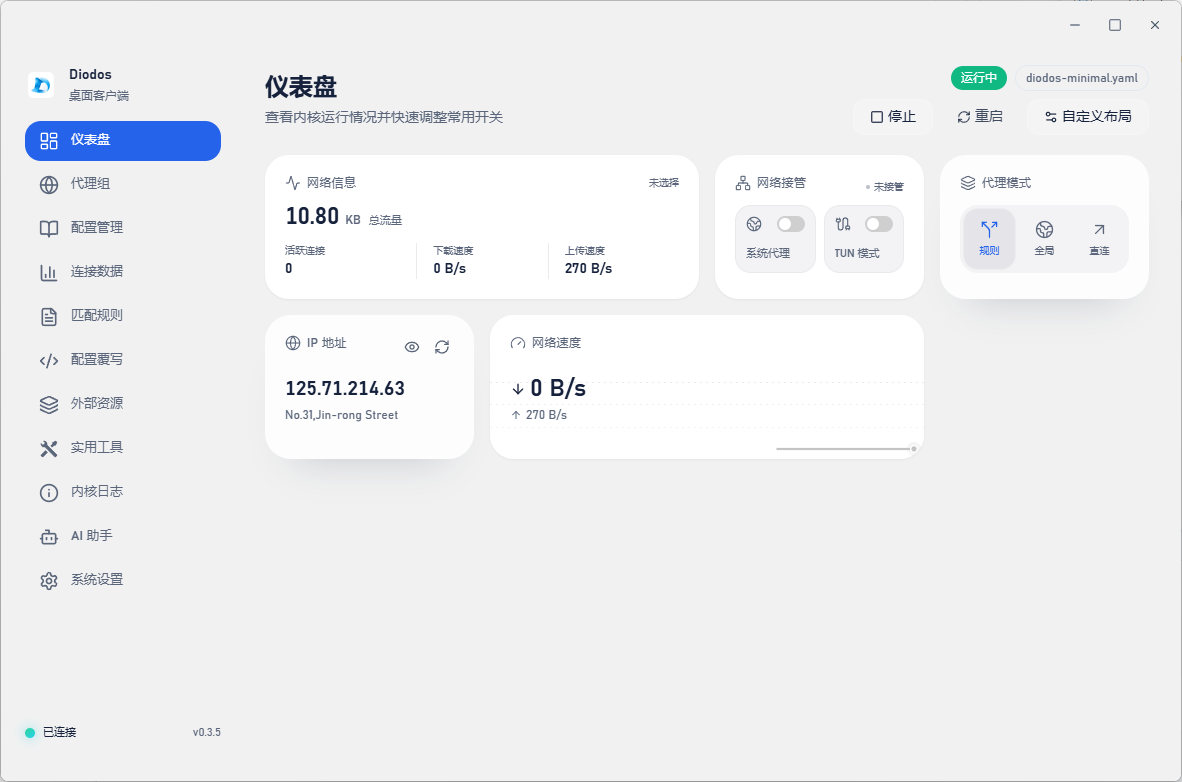
The dashboard is an assemblable card workspace: preview the layouts each card supports, add what you need, then drag to reorder. Standard half-width and full-width cards share the same height, while extra-large cards leave room for charts and lists.

  • Add, remove and drag to reorder; layout preferences persist across sessions
  • Switch layouts per card — sizes adapt to content
  • Cards share one consistent style, so any mix stays tidy
core

Driven by the Clash core

Diodos hands connections and routing to the Clash core. Rules, proxy groups and policies are enforced by the core — the interface exists so you can see and steer them.

subscription

Subscriptions and profiles

Import a full profile or a partial fragment: YAML or JSON files, single node links and Base64 subscriptions. The subscription card shows usage in a tilted progress ring, with expiry details only when they are actually available.

diagnostics

Media availability checks

Test common streaming and AI services individually, retest a single service straight from its row on the card, or open the full diagnostics panel for the complete report.

route

Interactive route tracing

A dedicated tracing page with target input, probe controls, a rotatable globe, per-hop statistics and report copying.

proxy

System proxy and TUN

The system proxy and TUN switches live in one network-control card, next to a redesigned proxy-mode selector and an IP card that separates direct from proxied connections.

Dashboard

Decide what to see, then decide how

A workspace you can reassemble: half-width, full-width and extra-large cards, drag to reorder, and it still looks the way you left it.

  • 01

    Cards are modules

    Traffic, connections, subscriptions, diagnostics and IP are separate cards.

  • 02

    Preview before adding

    See which layouts a card supports before it joins the dashboard.

  • 03

    Preferences stick

    Order and enabled state persist across sessions.

Real Diodos dashboard screenshot (v0.3.5): a modular card workspace

Real app screenshot · v0.3.5

Diagnostics

Stop guessing, start measuring

Streaming, AI services, connectivity and route paths — retest one item, or run the whole report at once.

Media and service availability

OK
Netflix Available
YouTube Available
Disney+ Available
ChatGPT Available
Prime Video Blocked
Spotify Available

Illustrative results; the in-app check is authoritative

Route tracing

6 hops

Per-hop latency · packet loss · node location

Core capability

Protocols come from the Clash core

Diodos does not invent protocols. Whatever the core supports can be loaded and switched — what you can actually use depends on your profile and subscription.

ShadowsocksVMessVLESSTrojanHysteria2TUICWireGuardSOCKS5 / HTTP

Protocol support depends on the Clash core and your own configuration.

Getting started

Three steps in

  1. STEP 01

    Download and install

    Pick the package for your platform and chip, then install it.

  2. STEP 02

    Import your profile

    Drop in a YAML or JSON file, paste a node link, or add a Base64 subscription.

  3. STEP 03

    Turn on the proxy

    Choose a proxy mode; enable TUN only when you need system-wide capture.

FAQ

A few things worth knowing first

Read all questions
What is Diodos?
Diodos is a network tool built on the Clash core, available as a desktop client and an Android client. It gives you a graphical interface for subscriptions, nodes, proxy modes and connection diagnostics. It does not provide nodes or subscriptions itself — you bring your own configuration.
How does Diodos Android relate to the desktop app?
Diodos Android is the Android client of Diodos, also built on the Clash core. It is developed and released in the separate Diodos-Android repository, with versioning and release cadence independent from the desktop builds. It shares the same design language: the componentized dashboard, subscription management and the AI assistant.
Is my configuration shared between Android and desktop?
Both clients import subscriptions the same way: YAML / JSON config files, node links or Base64 subscription URLs. Configuration is stored locally on each device and does not sync automatically, so import it separately on every device.
Windows shows a SmartScreen warning.
Unsigned installers trigger SmartScreen. Once you have confirmed the file came from the GitHub Releases page, choose “More info → Run anyway”. If the source is unclear, delete the file and download it again from the official release page.
What does TUN mode require?
TUN creates a virtual interface to capture system traffic, so the first activation needs administrator (Windows) or root (macOS / Linux) permission. If you do not need system-wide capture, the system proxy alone is enough.

See your network clearly — start with one install

Free and open source, with builds for Windows, macOS, Linux and Android.

Windows macOS Linux Free & open source

This is an Alpha release. Things move quickly — feedback on GitHub or Telegram is welcome.